
Adding text to 3D surfaces in Unity often involves compromises. You either bake it into textures, rely on world-space canvases, or create custom shaders that are hard to maintain. When the text needs to change at runtime, support localization, or animate per character, those approaches quickly become restrictive.
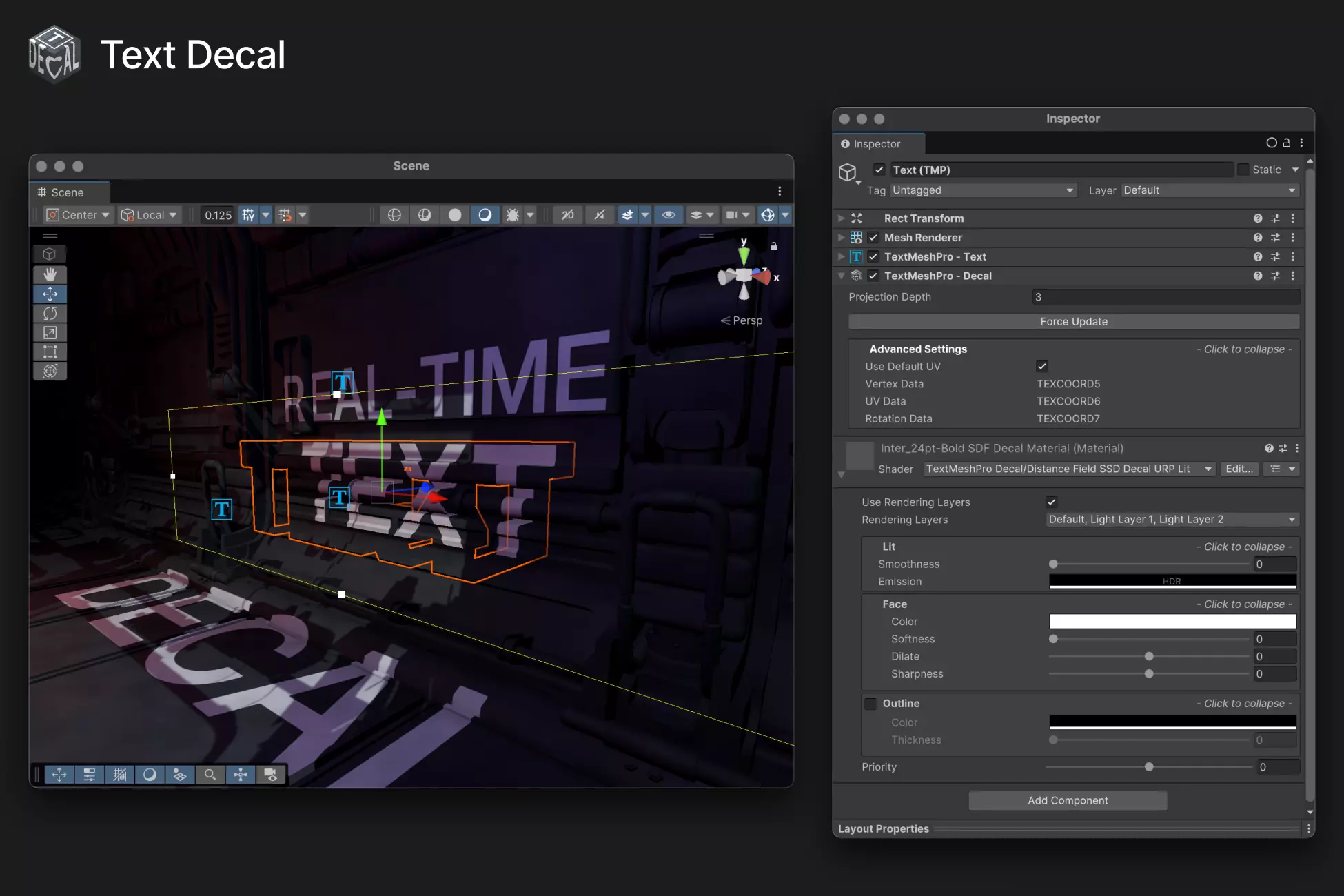
Text Decal, created by Kirill Chikalin, combines TextMesh Pro with the URP Decal Projector system to project editable, dynamic text directly onto meshes in real time. Instead of generating static textures, it treats text as a projected decal, keeping it fully editable and scriptable.
How It Works
The asset integrates:
- TextMesh Pro for text generation and formatting
- URP Decal Renderer Feature for projection
- A custom Text Decal renderer feature and shaders
The result is a system where TextMesh Pro content is rendered through a decal projector, allowing text to wrap onto 3D geometry without manual UV work or baking.
To use it, the project must:
- Enable the Decal Renderer Feature in URP
- Add the Text Decal Renderer Feature
- Import TextMesh Pro Essentials
- Assign the provided shader to the font material
- Attach the included TextDecal.cs script
Once configured, text can be projected onto surfaces using either Screen Space or DBuffer decal modes.
Core Features
Powered by TextMesh Pro
Because it builds on TextMesh Pro, the system supports:
- Rich text (color and alpha tags, bold, multiline)
- Runtime text updates
- Character-level mesh manipulation via script
This makes it suitable for dynamic signage, in-game UI elements embedded in the world, or animated text effects.
Runtime Mesh Modifications
The tool allows modification of character positions at runtime. This enables:
- Typing effects
- Per-character animation
- Custom distortions or layout behavior
Since the mesh remains editable, effects can be driven directly through code.
URP Decal Integration
Text Decal works with:
- Screen Space decals
- DBuffer decals
- Rendering Layers for selective projection
This allows control over which objects receive projected text and keeps integration aligned with URP’s rendering architecture.
Localization Support
The asset is compatible with Unity’s Localization package, making it suitable for multilingual projects. Because the text remains dynamic, switching languages does not require regenerating textures.
Cross-Platform Support
The tool is intended for desktop, mobile, and VR projects using URP. Performance is managed through the decal system rather than through heavy texture generation workflows.
Limitations
It's important to be aware that some TextMesh Pro features are not currently supported:
- Underline
- Strikethrough
- Italic
- Glow
Shader Graph integration is also not supported at this time. These constraints are important to consider if your project relies heavily on advanced TMP styling features.
Where It Fits Best
Text Decal is particularly useful for:
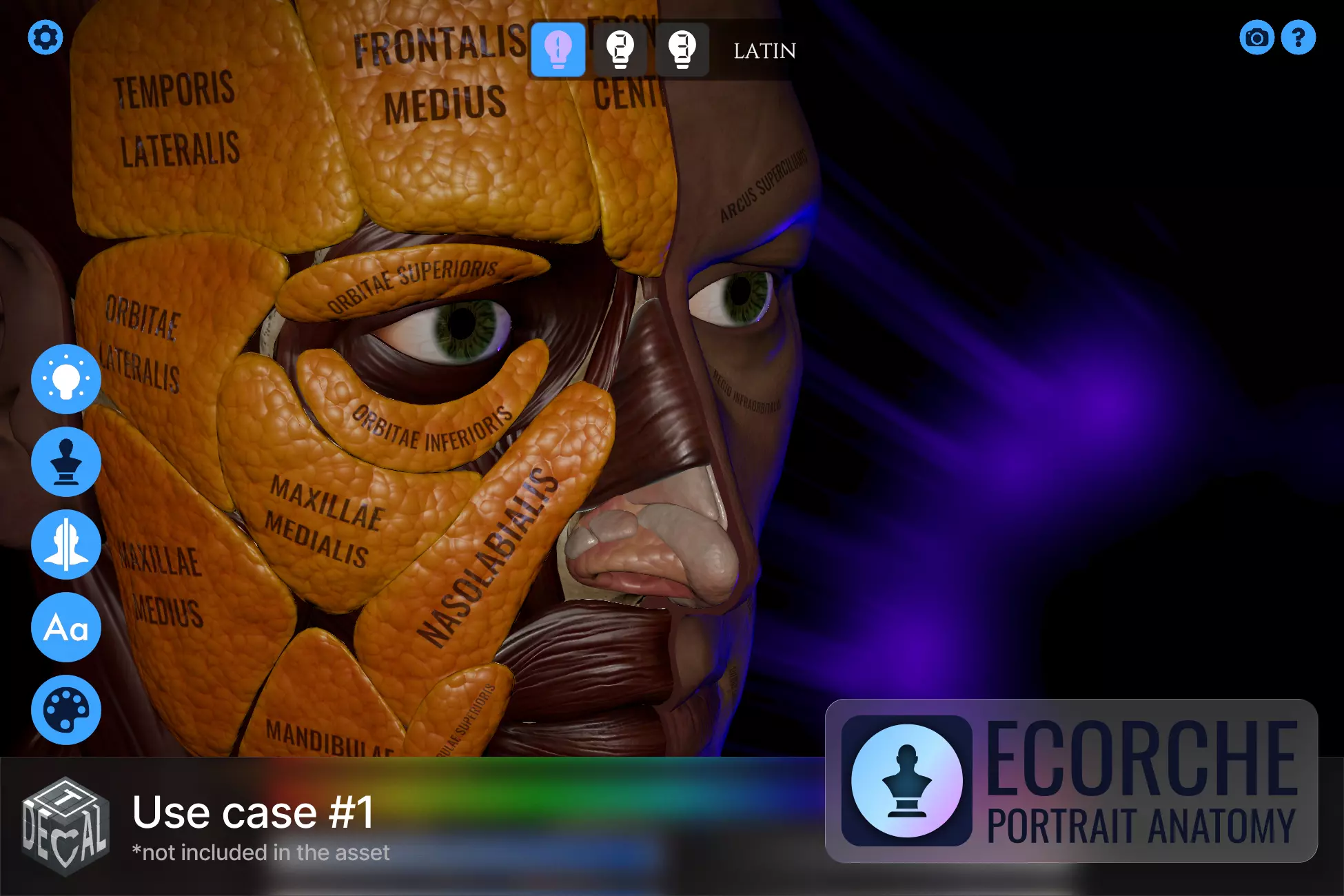
- In-world signage that must remain editable
- Diegetic UI projected onto surfaces
- Dynamic labeling systems
- VR or immersive environments requiring text integrated into geometry
- Projects with localization requirements
Similar and Useful Tools
- Dynamic Text To Texture [URP]: A shader-based VFX utility for Unity URP that lets you dynamically generate and render text to textures, which you can then map onto surfaces in real time. It’s designed for use with decals, UI effects, and surface text overlays.
Differences: Unlike Text Decal, which integrates TextMesh Pro + URP Decal Projector to project text directly onto scene geometry, Dynamic Text To Texture focuses on rendering text into a texture first, which you then apply, offering flexibility and use outside decal systems but requiring more setup for projection.
- Dynamic Decals (Open-Source): An open-source decal projection system for Unity’s Built-in Render Pipeline (with modern updates) that lets you project decals at runtime and supports pooling, masking, and flexible placement workflows.
Differences: This is a general decal projector system, not text-specific. It’s free and customizable, but unlike Text Decal it doesn’t include built-in text rendering or integration with TextMesh Pro, you’d need custom textures for text.
✨ Text Decal is now available on the Unity Asset Store.
📘 Interested in building your own Tools and Shaders in Unity? Check out the Unity Tool Development Bundle, which includes Shaders & Procedural Shapes in Unity 6 and Unity 6 Editor Tools Essentials.
📘 Interested in building your own Tools and Shaders in Unity? Check out the Unity Tool Development Bundle, which includes Shaders & Procedural Shapes in Unity 6 and Unity 6 Editor Tools Essentials.
Math + Procedural shapes + Tools in Unity! If you're into technical art, this Bundle is what you need 🔗 https://t.co/MflVh7KJnp#unity3dgamedevelopment #indiedevs #gamedevs pic.twitter.com/LHN2ci83SN
— The Unity Shaders Bible (@ushadersbible) November 8, 2025
Jettelly wishes you success in your professional career!
Did you find an error? No worries!
Write to us at [email protected], and we'll fix it!
Level up your Technical Art & Tool-Making skills! Grab our bundle and start learning today.
We invite you to explore "Unity Tool Development Bundle", a comprehensive bundle on the concepts and fundamentals seen in this post.
Other posts that might interest you.
-
 We take a look at RealBlend, a Unity tool by AdamNapper that combines multi-layer vertex painting, in-editor sculpting, and procedural mesh generation in one pipeline for HDRP and URP projects.
 -
 We take a look at Amplify Bloom by Amplify Creations, a now free high-quality post-processing solution for Unity’s Built-in Render Pipeline.
 -
 We take a look at Sprouty Dialogs, a free graph-based dialogue plugin for Godot 4.5+ that integrates branching logic, characters, variables, and translations directly into the editor.
