
CSVLocaleEditor: Editing CSV Localization Files Directly Inside Godot.
by Jettelly
Published |
Managing localization in Godot often means editing CSV files outside the engine. While functional, this can interrupt workflow when you need to quickly scan or adjust translation tables during development.
CSVLocaleEditor, a small open-source plugin by Krzysztof Stawinoga, addresses that gap by letting you open and edit CSV localization files directly inside the Godot editor, using a table-style interface instead of a text editor.
I made a tool that lets you create and edit CSV locale files directly in the editor
byu/Kris02111 ingodot
What the Tool Does
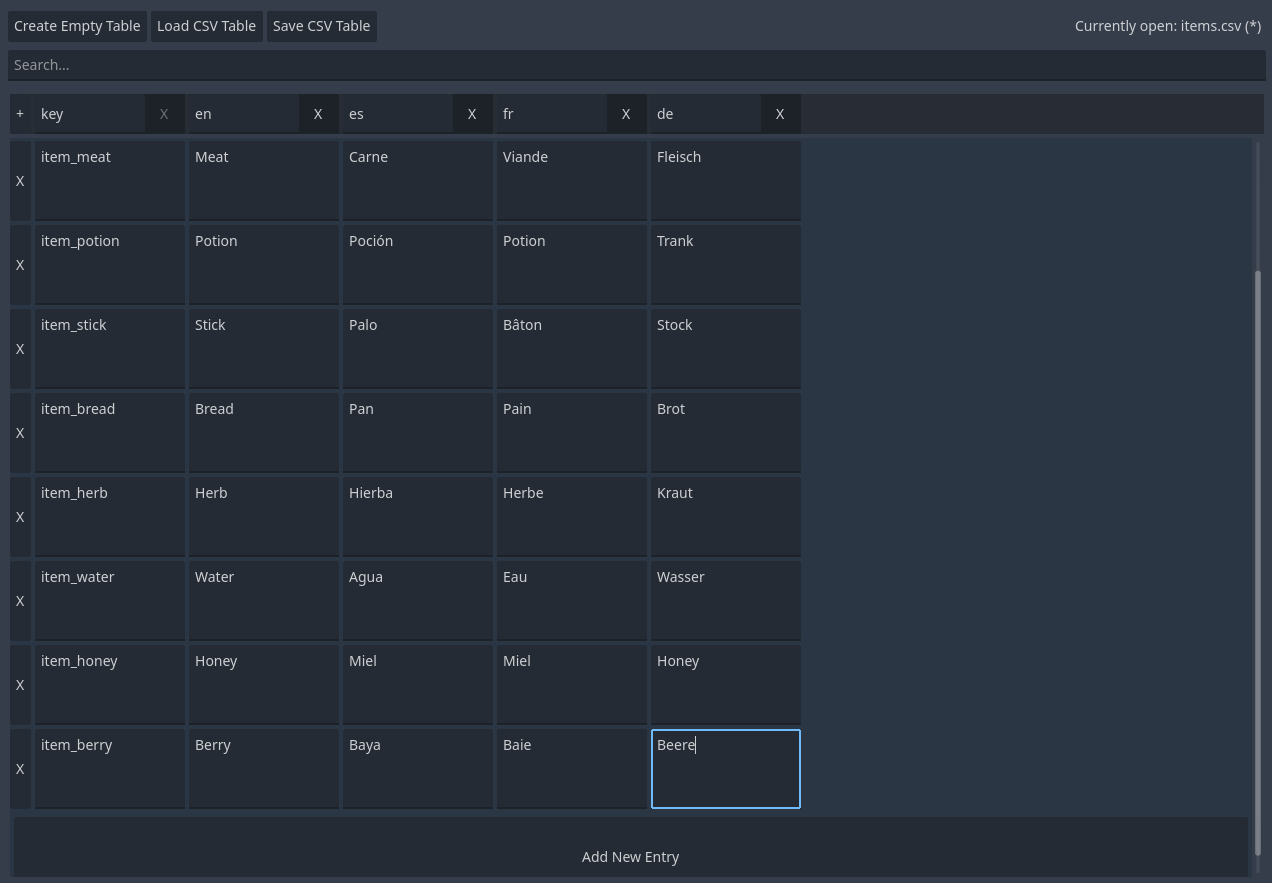
CSVLocaleEditor adds a custom editor view for CSV files used in localization workflows. Instead of opening CSVs in external tools, you can select them directly from Godot’s FileSystem dock and edit them in a structured table.
The plugin treats:
- Rows as translation entries
- Columns as locale codes
This mirrors how many developers already structure localization data, but keeps the entire process inside the editor.
Editor Integration and Workflow
The plugin integrates directly into Godot’s editor UI rather than introducing a separate window.
Key behaviors include:
- Opening CSV files directly from the FileSystem dock
- Editing cells in a grid-based view
- Adding or removing rows and columns without leaving the editor
Because it relies on standard CSV files, it does not introduce a new data format or override Godot’s existing localization pipeline.
Main Features
The current version focuses on core editing functionality.
Included features are:
- Full undo and redo support for table edits
- A search bar to quickly locate keys or values
- Adjustable row height, column width, and CSV delimiter via Project Settings
Planned Features
The author has mentioned a few ideas that are still work in progress. Right now, the main planned addition is:
- Pasting multiple entries from spreadsheet tools like Excel, with rows created automatically when needed
Configuration and Project Settings
Some aspects of the table behavior are configurable globally:
- Cell size
- Delimiter character used when parsing CSV files
This is useful if your project relies on non-standard CSV formatting or needs better readability for large tables.
Where This Tool Fits Best
CSVLocaleEditor makes sense if you:
- Use CSV files for localization in Godot
- Prefer editing translation tables visually instead of in a text editor
- Want a lightweight editor-side utility rather than a full localization framework
Similar and Useful Alternatives
Localization Editor: Another community version of Localization Editor for Godot that also emphasizes CSV translation editing inside the engine with simple UI tools to manage string lists
Differences: This version shares much in common with the prior Localization Editor entry but may vary slightly in UI or supported workflows. Both target CSV translation editing, whereas CSVLocaleEditor gives a slightly more “spreadsheet-like” table UI with search and undo/redo.
CSV – Localization template: A simple Godot project template that shows how to use CSV files for language switching in a project. This isn’t a full editor plugin but gives a structured starting point for multi-language support with CSVs.
Differences: This is a starter localization project template rather than an editor tool. It helps you set up CSV-based translation loading but lacks the in-editor management features that CSVLocaleEditor or Localization Editor provide.
✨ CSVLocaleEditor is currently available on GitHub.
📘 Interested in creating your own Tools and Shaders? Check out the Godot Shaders & Blender Tools Bundle, which includes: Blender Tool Development Fundamentals and The Godot Shaders Bible.
✨ CSVLocaleEditor is currently available on GitHub.
📘 Interested in creating your own Tools and Shaders? Check out the Godot Shaders & Blender Tools Bundle, which includes: Blender Tool Development Fundamentals and The Godot Shaders Bible.
Our best-selling indie Bundle: Godot shaders + Blender tools ✨ https://t.co/zSlHDCuGVC#b3d #GodotEngine #3DCG pic.twitter.com/sjdYxXjKUB
— The Unity Shaders Bible (@ushadersbible) November 16, 2025
Jettelly wishes you success in your professional career!
Did you find an error? No worries!
Write to us at [email protected], and we'll fix it!
Other posts that might interest you.
-
 We take a look at a free Godot add-on for sculpting, painting, and managing large terrains directly inside the editor.
 -
 We take a look at a recent free Unity integration tool for local text-to-speech, designed to run entirely on the user’s machine without cloud APIs or external services.
 -
 We take a look at a recent open-source Unity tool for generating 3D noise textures for volumetric clouds, including a standalone version that runs outside the editor.
