

Bending geometry in Blender is often handled through the Simple Deform modifier. While it works for basic cases, it becomes harder to control once you need precise deformation regions, predictable accumulation, or compatibility with Geometry Nodes workflows.
Better Bend is a Geometry Nodes–based tool by Nate Jolly that implements bending as a node group. The bend can be controlled directly in the viewport and integrated into existing Geometry Nodes setups, rather than being applied as a standalone modifier.
I was frustrated with bending in Blender, so I made a better version
byu/ProfessionDiligent53 inblender
What Better Bend Does
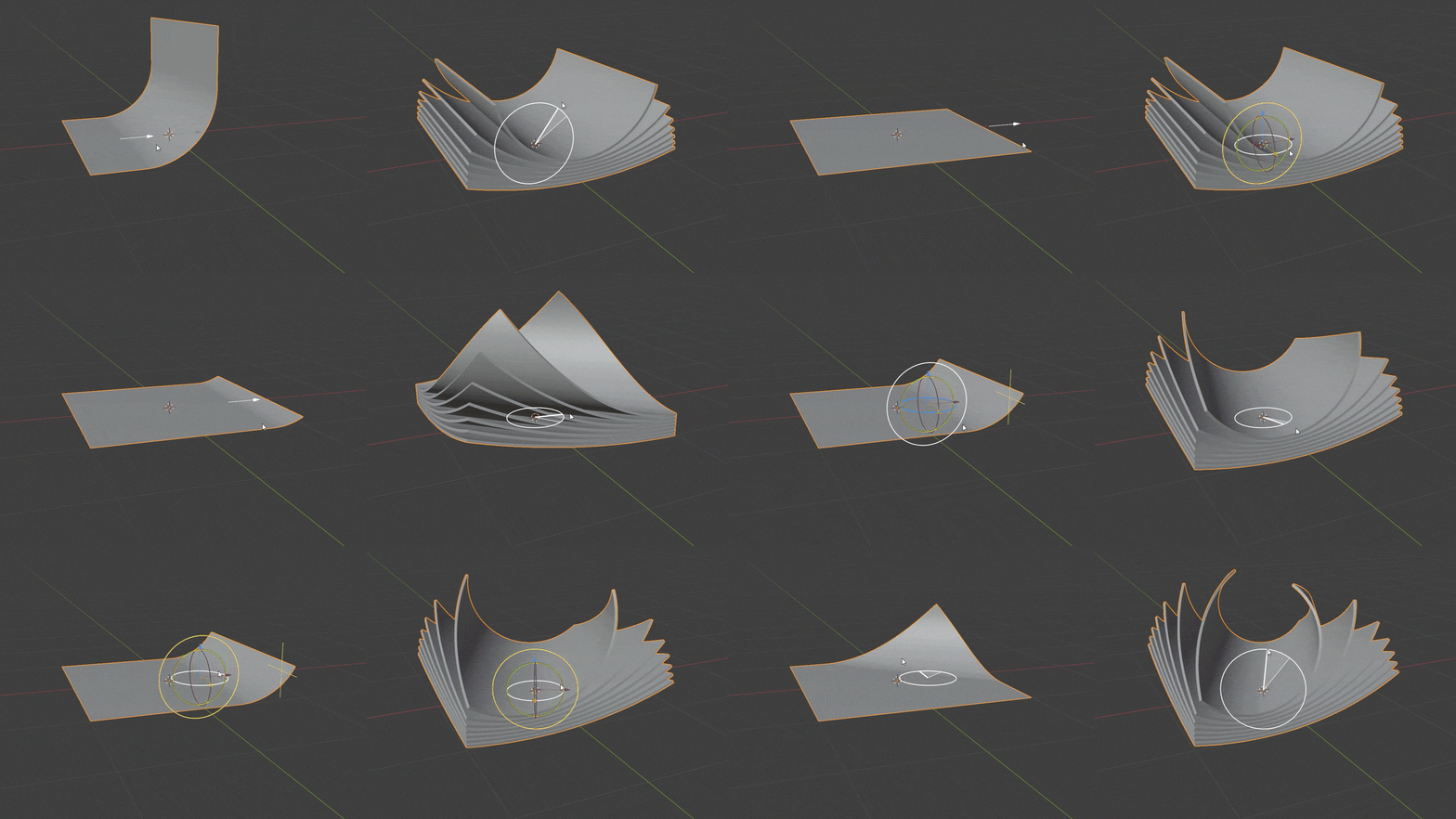
Better Bend is provided as a Geometry Nodes node group that performs controlled bending on geometry. The deformation is driven through viewport gizmos, allowing the bend position, direction, and orientation to be adjusted visually instead of relying only on numeric inputs.
Because it is a node group, it can be inserted into existing Geometry Nodes graphs, applied to generated geometry, or reused across multiple objects without duplicating setups.
The node group is limited to bending behavior and does not introduce additional modeling operations.
Controlling the Bend Region
One of the main differences compared to Simple Deform is how the bend is applied across the mesh.
With Better Bend, the deformation does not have to affect the entire object uniformly. You can define:
- Where the bend starts and ends
- How the bend accumulates along the geometry
- Whether sections beyond the bend straighten out or continue deforming
This makes it possible to bend only part of an object, apply gradual transitions, or keep certain areas unaffected, which is difficult to achieve with Simple Deform without additional helper objects or stacked modifiers.
Geometry Nodes Integration
Because Better Bend is built on Geometry Nodes:
- The same bend setup can be reused across multiple objects
- Collections can be brought into the node graph and deformed together
- Generated geometry can be bent as part of a procedural chain
All control is handled through the node group and its viewport gizmos, without relying on empties or external controllers.
.gif)
Typical Use Cases
Better Bend is most relevant in situations where controlled, repeatable bending is needed, such as:
- Motion graphics and explainer-style animations
- UI or interface-style visual elements
- Product visualization with controlled curvature
- Procedural setups where multiple objects share the same deformation logic
Similar and Useful Tools
Simple Bend Ex: Simple Bend Ex is an enhanced Blender addon that lets you procedurally bend mesh geometry with intuitive controls. You select faces to define the bend area and then adjust parameters like bend angle, axis, slicing and falloff directly in the viewport. It supports any orientation and can offset the bend location along the axis.
Differences: Simple Bend Ex focuses on basic geometry bending with direct selection and slicing control, whereas Better Bend uses a Geometry Nodes–based procedural setup with viewport gizmos for clean, repeatable deformation across objects.
Bender Add-on for Blender: Bender is a mesh bending addon that adds a bend gizmo and editable parameters to your mesh via a Geometry Nodes setup. You can apply multiple bends, control direction and falloff, and adjust the deformation non-destructively.
Differences: Bender provides multi-bend control and gizmo interaction for manual geometric deformations. Better Bend emphasizes predictable, clean deformation using Geometry Nodes and supports procedural reuse across multiple objects.
✨ Better Bend is now available on Gumroad.
📘 Interested in creating your own Tools and Shaders? Check out the Godot Shaders & Blender Tools Bundle, which includes: Blender Tool Development Fundamentals and The Godot Shaders Bible.
📘 Interested in creating your own Tools and Shaders? Check out the Godot Shaders & Blender Tools Bundle, which includes: Blender Tool Development Fundamentals and The Godot Shaders Bible.
Our best-selling indie Bundle: Godot shaders + Blender tools ✨ https://t.co/zSlHDCuGVC#b3d #GodotEngine #3DCG pic.twitter.com/sjdYxXjKUB
— The Unity Shaders Bible (@ushadersbible) November 16, 2025
Jettelly wishes you success in your professional career!
Did you find an error? No worries!
Write to us at [email protected], and we'll fix it!
Other posts that might interest you.
-
.jpg) A quick look at a Blender add-on that builds animated stylized water using shaders and Geometry Nodes, without simulations or baking.
A quick look at a Blender add-on that builds animated stylized water using shaders and Geometry Nodes, without simulations or baking. -
.jpg) We take a look at a Blender Geometry Nodes modifier for adding procedural fabric details like stitches, sequins, and embroidery directly onto surfaces.
We take a look at a Blender Geometry Nodes modifier for adding procedural fabric details like stitches, sequins, and embroidery directly onto surfaces. -
 We take a look at a growing HDRI collection focused on physically accurate lighting, offering calibrated environments with both free and paid resolution options.
